

MCP Servers
LLM Proxy can host Model Context Protocol servers behind the gateway. Each configured server is re-exposed at a stable URL:
https://your-proxy/servers/<server-name>/mcpMCP clients (Claude Code, Codex, Cursor, custom agents…) connect to that URL with a proxy API key and see the backend server's tools, resources, and prompts exactly as the backend exposes them — the proxy forwards tools/list, tools/call, resources/*, and prompts/* verbatim. Tool names are not renamed.
Two kinds of traffic
/servers/* is an MCP endpoint, not a model-facing tool injection: the proxy does not splice MCP tools into /v1/* requests. Connect your MCP client to /servers/<name>/mcp, and use API keys to authorize it — the same keys, budgets, rate limits, and logs apply.
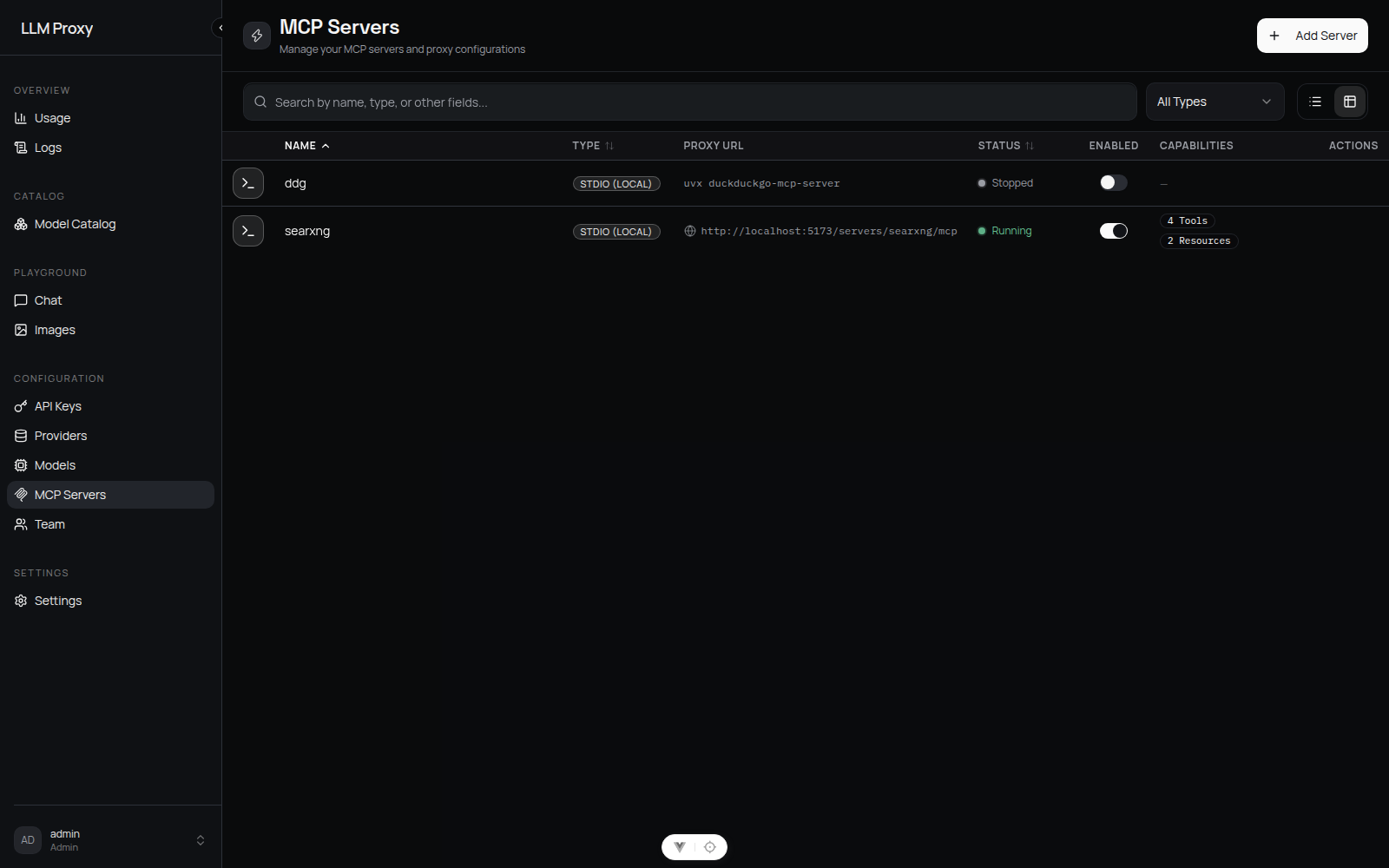
Adding a server
MCP Servers → Add Server:
| Field | Applies to | Notes |
|---|---|---|
| Name | both | Unique; becomes the URL path segment. May contain slashes |
| Type | both | stdio or streamableHttp |
| Command | stdio | Required. Must pass the security policy |
| Args | stdio | Free-form list; shell metacharacters (;, &&, ||, |, $(, backticks, >, <) are rejected |
| Env | stdio | Keys must be allowlisted; non-allowlisted keys are silently dropped |
| Base URL | streamableHttp | Required. Must be http/https and pass the SSRF checks |
Enabled servers start immediately and are auto-started on every process start (failures are logged and do not abort startup).
No custom HTTP headers
Remote (streamableHttp) servers are contacted without extra headers — there is no per-server header/auth field in v0.2.3. Use a network path you control, or a backend that authenticates by URL.
Who can manage servers
MCP servers execute processes and make outbound requests on the host, so creating and managing servers is admin-only. Members cannot create, edit, start/stop, or delete servers.
Members use admin-created servers through the proxy and control which of their own API keys may reach which server via the per-key allowlist (see Restricting access). The read-only GET /api/mcp/server-names endpoint gives members the server names they need to configure those allowlists, without exposing any server config.
Connecting a client
Point the MCP client at the proxy URL and give it an API key:
{
  "mcpServers": {
    "github": {
      "type": "streamableHttp",
      "url": "https://llm.example.com/servers/github/mcp",
      "headers": { "Authorization": "Bearer sk-your-proxy-key" }
    }
  }
}- Auth accepts
Authorization: Bearer sk-…orx-api-key: sk-…; console JWTs are not accepted on/servers/*. - Session keys created by the console (
sk-ui-…) also work. - Requests pass through the same protections as model traffic: IP lockout for invalid keys, per-key RPM limit, and budget caps (a budget check that cannot be confirmed returns 503, fail-closed).
Restricting access
Per-key allowlist (allowed_mcp_servers on the API key):
| Value | Meaning |
|---|---|
| Not set | All MCP servers allowed |
| Empty list | Deny all MCP servers |
| Names | Only those servers |
Every key owner can set this field on their own keys. Policy changes are cached for up to 60 seconds. The global switch require_key_mcp_permissions (Settings → Advanced → MCP Security) turns the whole check off — with it disabled, any valid key may use any server.
Security policy
MCP servers execute processes and make outbound HTTP requests on your behalf, so the proxy is deny-by-default. Configure in Settings → Advanced → MCP Security:
| Setting | Default | Behavior |
|---|---|---|
| Require key MCP permissions | on | Off = any valid key can use any server |
| Allowed commands | (empty) | Empty means no stdio command is permitted. Entries are either a bare basename (npx — any invocation) or an exact invocation (npx mcp-searxng) |
| Blocked commands | bash, sh, zsh, cmd.exe, powershell.exe, python, python3, node, perl, ruby | Always denied, even if allowlisted |
| Allowed env keys | (empty) | Empty means no custom environment variables are passed |
| Blocked env keys | PATH, LD_PRELOAD, DYLD_INSERT_LIBRARIES, PYTHONPATH, NODE_OPTIONS, SHELL, HOME, USER | Always stripped |
| Blocked URL hosts | (empty) | Hostname denylist for streamableHttp |
| Blocked URL IPs | loopback, RFC1918, link-local, 169.254.169.254, CGNAT, IPv6 equivalents | SSRF protection; hostnames are DNS-resolved and rejected if any resolved address is blocked (DNS-rebinding mitigation) |
Enforcement happens when a server is created or updated (HTTP 422) and again when the backend starts. Environment keys that are not allowed are dropped rather than rejected — the stored config shows only what survived.
Because the default allowlist is empty, a fresh install rejects every stdio server until a command is allowlisted. The console surfaces this directly: the server form checks the command, args, and env keys against the current policy as you type and links to MCP Security when something is not allowlisted, and API errors name the rejected command and point at the same setting.
Typical allowlist entry
For a Node-based server: allow command npx (or the exact npx @scope/server form) and add only the env vars the server needs. The container includes bunx and uvx, so Python/Node MCP servers work without extra installs.
Lifecycle and limits
- Start/stop: create, enable (
PUT enabled: true), disable (PUT enabled: false), delete. Disabling stops the process; enabling starts it. - No restart endpoint: editing command/args/env/base_url of a running server restarts its process so the new definition takes effect, on the worker that served the edit and on every peer that adopts the change.
- Status (
GET /api/mcp/servers/{name}/status) reportsrunning/stoppedfrom the in-memory registry. There is no periodic health check; stdio/HTTP backends attempt a one-shot reconnect on connection errors. - Capabilities (
GET /api/mcp/servers/{name}/capabilities) returns the tools, prompts, and resources the running server advertises. In the console, View Details on a server row opens the capabilities dialog. A stopped server has none. - Timeout: every backend operation is capped at 30 seconds (not configurable). Slow tools fail with an MCP timeout error.
Observability
Every MCP operation is logged (Logs → MCP Calls): server, operation, resource type/name, status, duration, and the arguments/results with sensitive fields masked. Server start/stop events are logged too.